JeanCarl's Adventures

Project 3: Count It! with Parse

June 17, 2015 | 15 Projects in 30 days

Have you ever counted the number of steps when you walk up a flight of steps? Wanted to know how many times you’ve done a certain task? We count things everyday!

This third project of my 15 projects in 30 days challenge will help you keep count. Using Parse, we’ll store items (it’s up to the user to determine what an item in a list represents) and keep a count of how many times that item is clicked on.

What’s great about using Parse is that we’ll see it is super easy to integrate user access control and allow multiple users to see only their list.

Parse

First off, we’ll need a place to store this list of items. Head over to https://www.parse.com and sign up for an account. Then go to your apps. Click on Create a new App tab in the top center of the page.

Click on the gear icon in the top right of the box representing the newly created app.

Photo

Select Keys from the list. Copy the Application ID and JavaScript Key for later.

Photo

Count It!

This project contains two files index.html, and countit.js. The neat part about this project is that there is no server backend, since we are using Parse. countit.js is the AngularJS controller that is used by index.html.

<!-- Filename: index.html -->
<!doctype html>

<!DOCTYPE html> 
<html ng-app="countItApp">

<head>
  <meta charset="utf-8">
  <meta name="viewport" content="width=device-width, initial-scale=1"> 
  <title>Count It!</title> 
  <link rel="stylesheet" href="http://code.jquery.com/mobile/1.1.1/jquery.mobile-1.1.1.min.css" />
  <script src="http://www.parsecdn.com/js/parse-1.2.13.min.js"></script>
  <script src="http://code.jquery.com/jquery-1.7.1.min.js"></script>
  <script src="http://code.jquery.com/mobile/1.1.1/jquery.mobile-1.1.1.min.js"></script>
  <script src="https://ajax.googleapis.com/ajax/libs/angularjs/1.3.16/angular.min.js"></script>
  <script src="countit.js"></script>
</head> 

<body ng-controller="CountItCtrl"> 

<div data-role="page">

  <div data-role="header" data-theme="b">
    ## Count It!
  </div><!-- /header -->

  <div data-role="content" > 
    <div ng-show="isLoggedIn()">
      <ul data-role="listview" data-inset="true" data-split-icon="delete">
        <li ng-repeat="item in items" >
          <a href="#" ng-click="item.increaseCount()">
            <h2>{{item.getTitle()}}</h2>
            <span class="ui-li-count">{{item.getTimesCompleted()}}</span>
          </a>
          <a href="#" ng-click="removeItem(item)" data-rel="popup" data-position-to="window" data-transition="pop">Remove Item</a>
        </li>
      </ul>

      <div style="clear: both; margin-top: 10px">
        <input type="text" ng-model="itemTitle" placeholder="Enter item name" /> <input type="button" ng-click="addItem()" value="Add" />
      </div>
    </div>

    <div ng-hide="isLoggedIn()">
      Username: <input type="text" ng-model="username" />
      Password: <input type="password" ng-model="password" />
      <input type="button" ng-click="logIn()" value="Login" /> or <input type="button" ng-click="signUp()" value="Sign Up!" />
    </div>
  </div><!-- /content -->
  
  <div data-role="footer" data-theme="b">
    <h4 ng-show="isLoggedIn()">Welcome {{getUsername()}}! <a href="#" ng-click="logout()">Logout</a></h4>
  </div><!-- /footer -->
  
</div><!-- /page -->

</body>
</html>
// countit.js
angular.module('countItApp', [])
.controller('CountItCtrl', function($scope) {
	$scope.username = $scope.password = $scope.itemTitle = '';
	$scope.items = [];

	Parse.initialize('APPLICATIONID',
                   'JAVASCRIPTKEY');

	var Item = Parse.Object.extend('Item', {
		increaseCount: function() {
		  this.save({timesCompleted: this.get('timesCompleted') + 1});
		},

		getTitle: function() {
			return this.get('title');
		},

		getTimesCompleted: function() {
			return this.get('timesCompleted');
		}
	})

	$scope.isLoggedIn = function() {
		return Parse.User.current() ? true : false;
	}

	$scope.logout = function() {
		Parse.User.logOut();
	}

	$scope.getUsername = function() {
		return Parse.User.current() ? Parse.User.current().getUsername() : '';
	}

	$scope.logIn = function() {
		Parse.User.logIn($scope.username, $scope.password, {
		  success: function(user) {
		    $scope.findItems();
		  },
		  error: function(user, error) {
		    alert('Error: ' + error.code + ' ' + error.message);
		  }
		});
	}

	$scope.signUp = function() {
		var user = new Parse.User();

		user.signUp({username: $scope.username,password: $scope.password}, {
		  success: function(user) {
		    $scope.logIn();
		  },
		  error: function(user, error) {
		    alert('Error: ' + error.code + ' ' + error.message);
		  }
		});
	}	

	$scope.addItem = function() {
		var item = new Item();

		item.save({
			title: $scope.itemTitle, 
			timesCompleted: 0,
			user: Parse.User.current(),
			ACL: new Parse.ACL(Parse.User.current())
		}, {
			success: function(item) {
				$scope.$apply(function() {
					$scope.items.push(item);
				});
			},
			error: function(t, error) {
				alert('Error: '+error.message);
			}
		});

		$scope.itemTitle = '';
	}

	$scope.removeItem = function(item) {
		for(var i=0; i<$scope.items.length; i++) {
			if($scope.items[i] == item) {
				$scope.items.splice(i, 1);
				item.destroy();
				break;
			}
		}
	}

	$scope.findItems = function() {
		var query = new Parse.Query(Item);
		query.find().then(function(list) {
			$scope.$apply(function() {
				$scope.items = list;
			});
		});
	}

	$scope.findItems();
});

Using the Application ID and JavaScript Key from Parse, insert these values in the countit.js file.

Parse.initialize('APPLICATIONID',
                   'JAVASCRIPTKEY');

And that’s it for setting up this project! Head over to index.html and you’ll be prompted to login, or sign up. Since we don’t have a user account yet, enter a username and password, and click Sign Up!

Photo

It should login automatically.

Photo

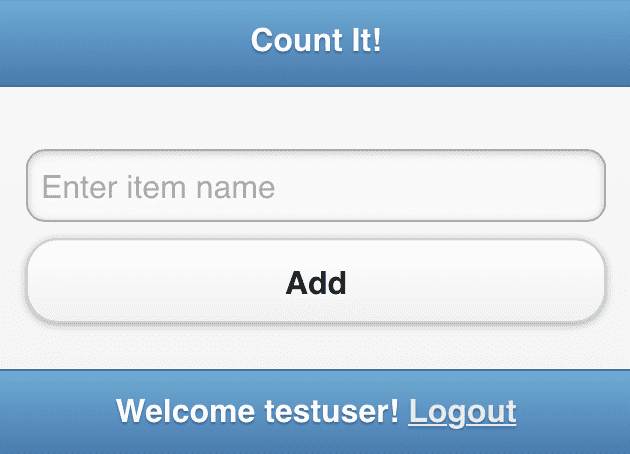
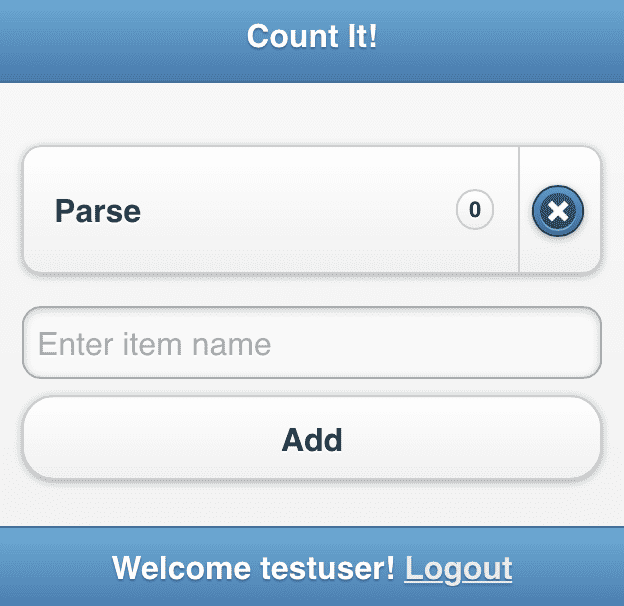
Enter a name of something you want to start counting. For my example, I’m wanting to count the number of times I’ve used different types of technologies thus far in my 30 day challenge. I’ll add “Parse” to the list.
Photo

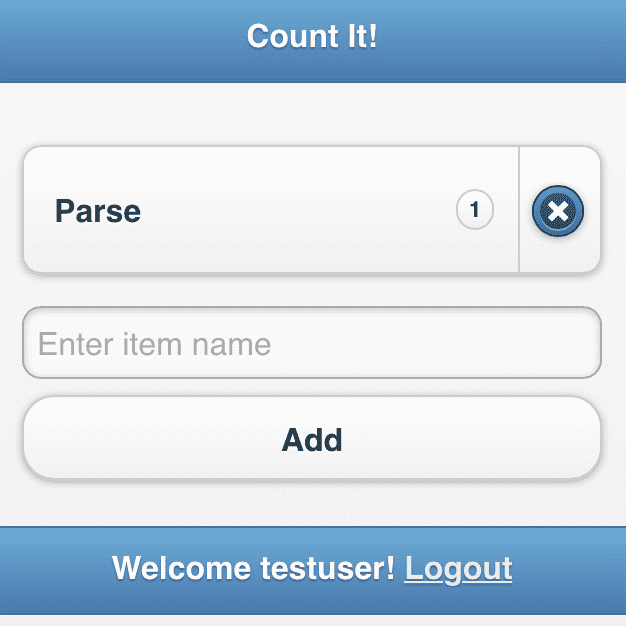
When I click Add, the app will create a new Item object on Parse, and add it to the list. If I click on the item, the bubble count increases by one.
Photo

If I click on the X, the item is removed from the list and from Parse.

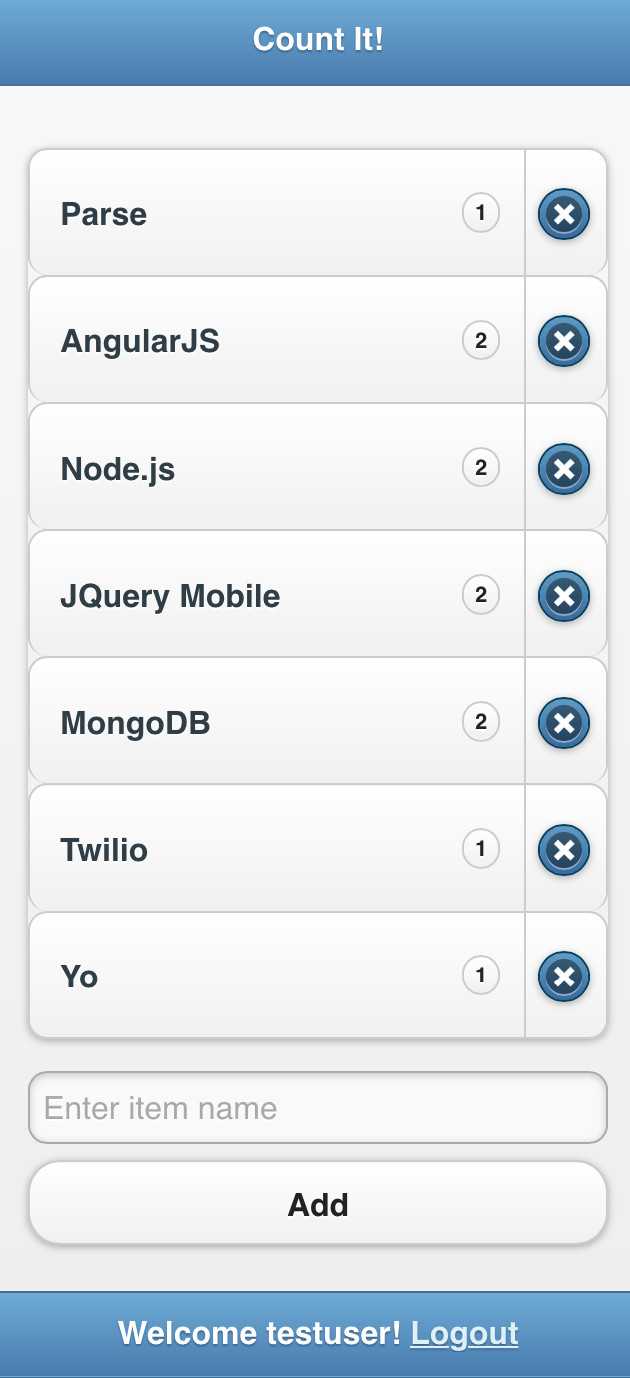
After adding a number of items and counting them, here’s the stats thus far.
Photo

If you click on Logout at the bottom of the page, you’re logged out and can either login again, or create another user. This second user has their own list and cannot see the items of that the first user created. This is because when the Item object is created, we specify the user in the ACL (Access Control List). Parse automatically filters the results to only ones that the current user has access to.

Source Code

You can find the repo on GitHub.

That’s it for this project. Here are additional ideas that might be added to this project:

  • Order the list with count in descending order. The more I use a technology, the higher up the list goes.
  • Add groupings, where you might have a list for APIs, Frameworks, etc.

Post-mortem

The ACL is deceivingly simple yet very powerful. If you’ve ever tried creating a database of user objects and had to create your own ACL methods, you know the logic and legwork that it requires. I feel like there’s a lot more that can be done with the ACL model.

The one hiccup that took me time to understand is why AngularJS wasn’t updating the item list. The trick was to wrap the code in $scope.apply(function() { … }) to notify AngularJS that the data was being updated.

15 Projects in 30 Days Challenge

This blog post is part of my 15 projects in 30 days challenge. I’m hacking together 15 projects with different APIs, services, and technologies that I’ve had little to no exposure to. If my code isn’t completely efficient or accurate, please understand it isn’t meant to be complete and bulletproof. When something is left out, I try to mention it. Reach out to me and kindly teach me if I go towards the dark side. ?

This challenge serves a couple of purposes. First, I’ve always enjoyed hacking new things together and using APIs. And I haven’t had the chance (more like a reason) to dive in head first with things like AngularJS and Parse. This project demonstrated AngularJS and Parse.

Project 2: Yo a Pic with Yo

June 15, 2015 | 15 Projects in 30 days

I enjoy taking pictures of things I see and places I go. However, many of those photos sit on a harddrive, rarely being appreciated. For my second project of my 15 projects in 30 days Challenge, I will use the Yo app to highlight my favorites and inspire me.

If you’re not familiar with the Yo app, it’s very simple to use. You can download the app from the iTunes store here. You add usernames to a colorful list. When you tap on a name, you “yo” them. The yo concept between people is at first a bit boring and hard to realize the potential value. But you can yo services and receive links back to things like blog posts, websites, pictures, etc.


To get started in the iOS app, choose a username and password to sign up.

Photo

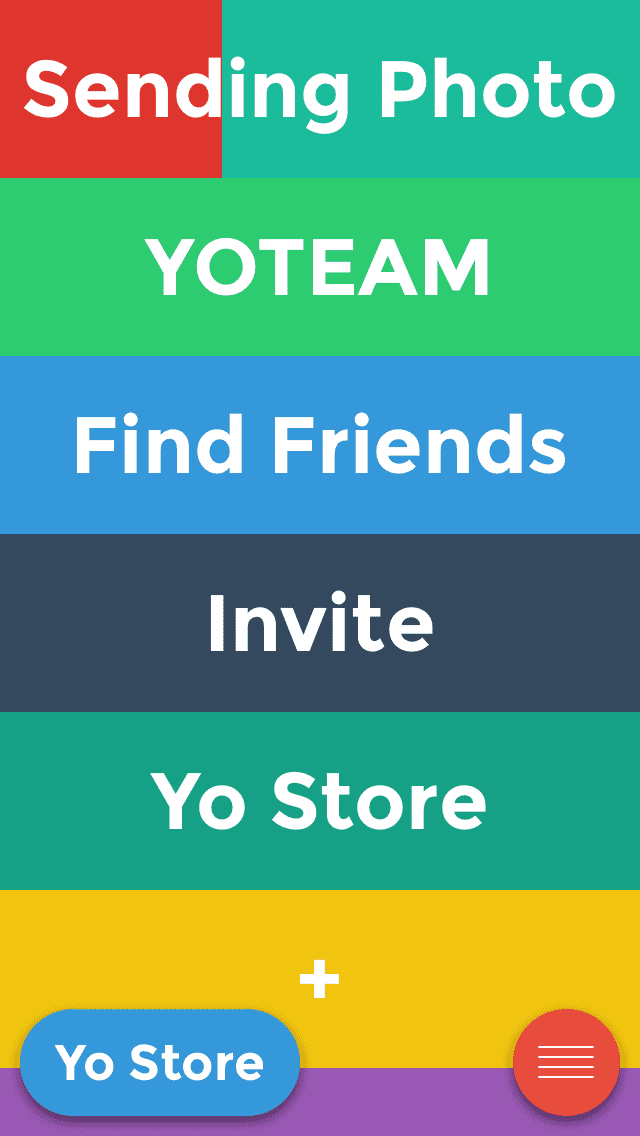
By default, the YOTEAM account is added to the list.

Photo

To access the developer resources, head over to https://dashboard.justyo.co/ and login with the same username and password you just signed up with. On the left side is a menu with + Add Account. This is where you can add more accounts and set up a callback URL when an account is yo’ed.

I’m going to set up a new account, YOAPIC, and point it to my Node.js app.

Photo

The two URL fields will depend on where you set up the Node.js application. For the rest of the example, I’m going to use the IP address 0.0.0.0 and port 8080 to represent the IP address of the server and port hosting my Node.js application.

For the Welcome Yo URL address, enter http://0.0.0.0:8080/index.html For the Callback URL, enter http://0.0.0.0:8080/yo/callback

Don’t forget to substitute your IP address! Click Create.

MongoDB

We’ll use a MongoDB database to store a reference to each picture sent to the service. If you don’t have MongoDB installed, run the following command:

apt-get install mongodb

To check that it is running, run this command:

service mongodb status


Node.js

In keeping with the simplicity of the Yo service, we we only have two files, server.js and index.html. index.html serves as the welcome instructions and also as a link to instructions to guide the user when there are no pictures available to send.

// Filename: server.js

// API key for Yo user.
var apiKey = 'XXXXXXXX-XXXX-XXXX-XXXX-XXXXXXXXXXXX';

// The URL for instructions on how to use.
var welcomeLink = 'http://XXX.XX.XX.XXX:8080/index.html';

// Mongo DB server address.
var mongooseServerAddress = 'mongodb://127.0.0.1:27017/test';

// What port to listen to.
var port = 8080;

/*********** End Configuration ***********/

var express = require('express');
var app = express();
var bodyParser = require('body-parser');
var mongoose = require('mongoose');
var http = require('http');
var querystring = require('querystring');
var url = require('url');
var request = require('request');

app.use(bodyParser.json());
app.listen(port);

console.log("App listening on port "+port);

mongoose.connect(mongooseServerAddress);

var PictureSchema = new mongoose.Schema({
    username: String,
    photo: String,
});

PictureSchema.statics.random = function(cb) {
  this.count(function(err, count) {
    if(err) 
        return cb(err);

    var rand = Math.floor(Math.random() * count);
    this.findOne().skip(rand).exec(cb);
  }.bind(this));
};

var Picture = mongoose.model('Charlie', PictureSchema);

function sendYo(yo)
{
    // Uncomment if you receive a self-signed certificate in chain error.
    // process.env.NODE_TLS_REJECT_UNAUTHORIZED = "0";

    request(
        {
            url: 'https://api.justyo.co/yo/',
            qs: yo,
            method: 'POST',
        },
        function(error, response, body) {
            if(error || response.statusCode != 200) {
                console.log('Unable to send a Yo!');
            }
        }                
    );
}

// Callback handler for Yo service.
app.get('/yo/callback', function(req, res) {
    var query = url.parse(req.url, true).query;

    if('link' in query) {
        var pic = {
            photo: query.link,
            username: query.username
        };

    	Picture.create(pic, function(err, pic) {
            if(err)
            {
                console.log('Unable to add picture to database');
                return;
            }
        });
    } else {
        // Mirror, mirror, on the wall, pick a random picture please!
        Picture.random(function(err, pic) {
            if(err) {
                console.log('Unable to get picture from database');
                return; // We'll ignore an error or no picture.
            }

            // If there is no picture to send back, send the 
            // instructions so we can get a picture in the system!
            if(!pic) {
                sendYo({
                    username: query.username, 
                    api_token: apiKey, 
                    link: welcomeLink
                });    

                return;        
            }
    
            // Send the link to the picture.
            sendYo({
                username: query.username, 
                api_token: apiKey, 
                link: pic.photo
            });
        });
    }
});

app.use(express.static(__dirname + '/public'));
<!-- Filename: index.html -->
<html>
<head>
  <meta name="viewport" content="width=device-width, initial-scale=1">
  <title>Yo A Pic</title>
</head>
<body style="font-family: Arial; text-align: center">
<h2>Yo A Pic</h2>
<p>Yo me pictures to remember.</p>
<p>I"ll send a random picture back to you when you just yo me.</p>
</body>
</html>

To install Node.js, run the following commands:

sudo apt-get update
sudo apt-get install nodejs
sudo apt-get install npm

Some version info:

# nodejs -v
v0.10.25

# npm -v
1.3.10

This project requires a couple of modules to be installed. Run these three commands to install the express, body-parser, and mongoose node modules.

npm install express
npm install body-parser
npm install mongoose

To start the Node.js application

nodejs server.js

Let’s do it!

Now the fun part happens. Go back to the Yo app and add the service username (i.e. YOAPIC) we created in the dashboard. There’s a plus sign at the bottom of the list.

Photo

Photo

Now you can Yo the service for the first time. Here’s how the process works. The first time you yo the username YOMYPIC, you’ll get a welcome Yo. It’s a link to the index.html URL you specified in the Welcome Yo field during setup. This will give the user a little bit of information on how to use this service.

Photo

Let’s go ahead and add a picture. Take a picture with your phone. View it in Photos.

Photo

Long press on the picture to get a option to copy it. This copies the photo to the clipboard.

Photo

Go back to the Yo app and press and hold down on the username you want to send the photo to. You’ll see a moving red slider go across the screen. When complete, it will Yo the picture to the service.

Photo

Photo

When that happens, a request is made to /yo/callback?user_ip=XXX.XXX.XXX.XXX&username=YOURUSERNAME&link=http%3A%2F%2Fi.imgur.com%2FXXXXXXX.jpg

There’s two things to note about the query string. username is the user’s account that is yo’ing the picture. The picture is sent as a imgur url in the link query parameter. That’s convenient since we won’t have to worry about storing actual images, just a URL reference.

Our callback handler does two things. If there is a link query parameter present, it will add the username and picture URL into the MongoDB. If there isn’t a picture link attached, we pick a random one from the database and yo it back to the user. In the unlikely event there are no pictures in the database, we send the default Welcome page with instructions on how to use our service, just in case the user forgets how to use it.

Since we have a picture in the database, let’s get a random picture. Tap on the username in the Yo app and wait for the yo response.

Photo

When you open it, you will see the picture you just Yo’d.

Photo

Take another picture, copy it, press and hold down the username until the picture is sent. You should have two pictures in the database now. If you send a yo, you should get one of the two pictures. The more pictures there are in the database, the less likely you’ll see the same picture over and over.

Source Code

You can find the repo on GitHub.

That’s all there is for this project. Here are some ideas to enhance it:

  • We’re all one big happy family. But I really just want MY pictures back. Right now any picture submitted by any user can be returned to any user. Modify the database query to return only pictures by the inquiring user.
  • When a random picture is sent, it’s just the URL to the image. Change the link reference to be something like /yo/show?imageurl=“+pic.photo and enhance the photo viewer. You'll need to add an app.get('/yo/show'.... handler in server.js
  • Add the ability to regularly Yo a random picture to a subscriber automatically.

15 Projects in 30 Days Challenge

This blog post is part of my 15 projects in 30 days challenge. I’m hacking together 15 projects with different APIs, services, and technologies that I’ve had little to no exposure to. If my code isn’t completely efficient or accurate, please understand it isn’t meant to be complete and bulletproof. When something is left out, I try to mention it. Reach out to me and kindly teach me if I go towards the dark side. ?

This challenge serves a couple of purposes. First, I’ve always enjoyed hacking new things together and using APIs. And I haven’t had the chance (more like a reason) to dive in head first with things like NodeJS, and MongoDB. This project demonstrated Node.js, MongoDB, and interacting with the Yo API manually.

Project 1: Remind Me with Twilio

June 12, 2015 | 15 Projects in 30 days

If I’m supposed to keep a schedule of when each project is supposed to start and end, I’m going to need some reminders. How about we set up a SMS reminder system? Here’s my thought process in planning out what should happen.

First, a user will register a number and be able to set up one-time reminders. Each reminder will have a specified time it should be sent, a message, and a destination phone number.

For simplicity, we’ll restrict the time to be on the minute level. That way, we can run a task once a minute, check for new reminders to be sent, process them, and wait until the next interval. If no messages meet that criteria, nothing will be done.

Some logistics I’m thinking about:

SMS message length limit is 160 characters. Even though Twilio allows up to 1600 characters, spliced into 160 character message chunks, for simplicity, the message length should be limited to 160 characters.

This is inherently going to be restricted to a small use case since Twilio limits who can receive SMS messages from trial accounts.

Can I run a cron job to process messages? Can I use a purely JavaScript intervals using setInterval?

The Setup

I’m using a basic Ubuntu 14.04 webserver. Let’s start with setting up Node.js and MongoDB. AngularJS and JQuery Mobile will use CDN versions.

MongoDB will store the reminders, AngularJS will receive the user’s information, and Node.js will be the glue between. JQuery Mobile will provide a quick UI framework to make it look decent.

Node.js

To install Node.js:

sudo apt-get update
sudo apt-get install nodejs
sudo apt-get install npm

Some version info:

# nodejs -v
v0.10.25

# npm -v
1.3.10

Twilio

I’m really eager to test out Node.js and see if Twilio is simple to use on this platform! Let’s install the Node.js helper library Twilio has provided.

npm install twilio

Let’s create a simple test to make sure things are working right. Create a twiliotest.js file.

// Filename: twiliotest.js
// Your accountSid and authToken from twilio.com/user/account
var accountSid = "ACXXXXXXXXXXXXXXXXXXXXXXXXXXXXXXXX";
var authToken = "XXXXXXXXXXXXXXXXXXXXXXXXXXXXXXXXX";

// Replace with path to the node module (i.e. /usr/local/lib/node_modules/twilio)
var client = require('twilio')(accountSid, authToken);

client.messages.create({
	body: "Don’t forget to finish project 2!",
	to: "+15555555555", // Change to your verified phone number
	from: "+15555555555" // Change to Twilio phone number
}, function(err, message) {
	process.stdout.write(message.sid);
});

Run it from the command line to make sure the code works as expected.

nodejs twiliotest.js

And you should see a message id come back if successful:

# nodejs twiliotest.js
SM5XXXXXXXXXXXXXXXXXXXXXXXXXXXXXXX

After successfully checking that the SMS is sent, we’re on the way to making this idea a reality. Yay!

MongoDB

Next thing we need is a place to store these messages until they are sent. We’ll use MongoDB to store JSON objects that represent each message. To install MongoDB, run this command:

apt-get install mongodb

To check that it is running, run this command:

service mongodb status

AngularJS

We’re going to use a CDN version of AngularJS for simplicity. You can find one hosted by Google here.

I’m using https://ajax.googleapis.com/ajax/libs/angularjs/1.3.15/angular.min.js.

JQuery Mobile

To make a quick UI, we’re going to use a stock JQuery Mobile template using the libraries hosted by a CDN.

Remind Me!

We have four files, server.js, sendreminders.js, index.html, and reminders.js.

// Filename: server.js
var mongooseServerAddress = 'mongodb://127.0.0.1:27017/test';

var express = require('express');
var app = express();
var bodyParser = require('body-parser');
var mongoose = require('mongoose');

app.use(bodyParser.json());
app.listen(8080);

console.log("App listening on port 8080");

mongoose.connect(mongooseServerAddress);

var Reminder = mongoose.model('Reminder', {
    text: String,
    time: Number,
    phonenumber: String
});

// Returns reminders associated with the given phone number.
app.get('/api/reminders', function(req, res) {
	var url = require('url');
	var url_parts = url.parse(req.url, true);
	var query = url_parts.query;

	Reminder.find({phonenumber: query.phonenumber}, function(err, reminders) {
        if (err)
            res.send(err);

        res.json(reminders);
    });
});

// Adds a reminder for a specific phon number.
app.post('/api/reminders', function(req, res) {
	var r = Reminder.create({
            text: req.body.text,
            time: req.body.time,
            phonenumber: req.body.phonenumber
        }, function(err, reminder) {
            if (err)
                res.send(err);
            
            res.send(reminder);
        });
});

// Removes a reminder.
app.post('/api/reminders/remove', function(req, res) {
	Reminder.remove({_id: req.body.reminderId}, function(err, reminder) {
    if (err)
        res.send(err);            
	});
});

app.use(express.static(__dirname + '/public'));
// Filename: sendreminders.js

// Twilio Account SID
var twilioAccountSid = 'ACXXXXXXXXXXXXXXXXXXXXXXXXXXXXXXXX';

// Twilio Auth Token
var twilioAuthToken = "XXXXXXXXXXXXXXXXXXXXXXXXXXXXXXXX";

// Twilio phone number to send SMS from.
var twilioNumber = 'XXXXXXXXXX';

// Set to how frequently the queue should be checked.
var frequencyMilliseconds = 5000;

// Mongo DB server address
var mongooseServerAddress = 'mongodb://127.0.0.1:27017/test';

/*********** End Configuration ***********/

var client = require('twilio')(twilioAccountSid, twilioAuthToken);
var mongoose = require('mongoose');

mongoose.connect(mongooseServerAddress);

var Reminder = mongoose.model('Reminder', {
    text: String,
    time: Number,
    phonenumber: String
});

setInterval(function()
{
	var timeNow = new Date();
	console.log(Math.floor(timeNow.getTime()));

	// Find any reminders that have already passed, process them, and remove them from the queue.
	Reminder.find({"time": {$lt: Math.floor(timeNow.getTime())}}, function(err, reminders)
	{
		if(err)	{
			console.log(err);
			return;
		}

		if(reminders.length == 0)
		{
			console.log('no messages to be sent');
			return;
		}

		reminders.forEach(function(message)
		{
			client.messages.create({
			    body: message.text,
			    to: "+1"+message.phonenumber,
			    from: "+1"+twilioNumber
			}, function(err, sms) {
				if(err)
					console.log(err);

				console.log('sending '+message.text+' to '+message.phonenumber);
			    process.stdout.write(sms.sid);
			});
			
			Reminder.remove({_id: message._id}, function(err)
			{
				console.log(err)
			});
		});
	});
}, frequencyMilliseconds);
<!-- Filename: index.html -->
<!doctype html>

<!DOCTYPE html> 
<html ng-app="reminderApp">

<head>
  <meta charset="utf-8">
  <meta name="viewport" content="width=device-width, initial-scale=1"> 
  <title>Remind Me!</title> 
  <link rel="stylesheet" href="http://code.jquery.com/mobile/1.1.1/jquery.mobile.1.1.min.css" />
  <script src="http://code.jquery.com/jquery-1.7.1.min.js"></script>
  <script src="http://code.jquery.com/mobile/1.1.1/jquery.mobile-1.1.1.min.js"></script>
  <script src="https://ajax.googleapis.com/ajax/libs/angularjs/1.3.16/angular.min.js"></script>
    <script src="reminder.js"></script>
</head> 

<body> 

<div data-role="page">

  <div data-role="header" data-theme="b">
    ## Remind Me!
  </div><!-- /header -->

  <div data-role="content"> 
    <div ng-controller="ReminderListController as reminderList">
      <h3>My Phone #</h3>
      <input type="text" ng-model="reminderList.phonenumber" ng-blur="reminderList.fetchList()" />
      
      <h3>My Reminders <div ng-show="reminderList.syncing">Syncing...</div></h3>
      <ul data-role="listview" data-inset="true" data-split-icon="delete" data-split-theme="d">
        <li ng-repeat="reminder in reminderList.reminders | orderBy:'time'">
          <a href="#"><h2>{{reminder.text}}</h2>
          <p>{{reminder.time | date:"MM/dd hh:mm a"}}</p>
          <a href="#" ng-click="reminderList.removeReminder(reminder)" data-rel="popup" data-position-to="window" data-transition="pop">Remove Reminder</a>
        </a>
        </li>
      </ul>
      <div ng-hide="reminderList.reminders.length > 0">
        You have no reminders!
      </div>
      
      <form ng-show="reminderList.phonenumber.length == 10">
        <h3>New Reminder</h3>
        <input type="text" ng-model="reminderList.reminderText"  size="30"
               placeholder="remind me about..."> 
        <div class="ui-grid-a">
          <div class="ui-block-a">
            on<br />
            <input type="date" ng-model="reminderList.reminderDate" />
          </div>
          <div class="ui-block-b">
            at<br />
            <input type="time" ng-model="reminderList.reminderTime"/>
          </div>
        </div>
        <input class="btn-primary" type="button" ng-click="reminderList.addReminder()" value="Add">
      </form>
    </div>
  </div><!-- /content -->
  
  <div data-role="footer" data-theme="b">
    <h4>Copyright (c) JeanCarl Bisson</h4>
  </div><!-- /footer -->
  
</div><!-- /page -->

</body>
</html>
// Filename: reminders.js

angular.module('reminderApp', [])
  .controller('ReminderListController', function($scope, $http, $filter) {
    var reminderList = this;

    reminderList.reminderDate = new Date();
    reminderList.reminderTime = new Date();
    reminderList.reminderTime.setMilliseconds(0);
    reminderList.reminderTime.setSeconds(0);
    reminderList.syncing = false;

    reminderList.reminders = [];

    // Get reminders from the server.
    reminderList.fetchList = function() {
      reminderList.syncing = true;
      
      $http.get('/api/reminders?phonenumber='+reminderList.phonenumber).success(function(response) {
        reminderList.reminders = response;
        reminderList.syncing = false;
      });
    };
 
    reminderList.addReminder = function() {
      var reminderDateTime = new Date($filter('date')(reminderList.reminderDate, 'yyyy-MM-dd')+" "+$filter('date')(reminderList.reminderTime, 'HH:mm'));

      var data = {
        text: reminderList.reminderText, 
        time: reminderDateTime.getTime(), 
        phonenumber: reminderList.phonenumber,
        done:false
      };

      $http.post('/api/reminders', data).success(function(response) {
        reminderList.reminders.push(response);
        reminderList.reminderText = '';
      });
    };
 
    reminderList.removeReminder = function(reminder) {
      var oldReminders = reminderList.reminders;
      console.log(reminder);
      reminderList.reminders = [];
      angular.forEach(oldReminders, function(r) {
        if(reminder._id != r._id) {
          reminderList.reminders.push(r);
        }
      });

      $http.post('/api/reminders/remove', {reminderId: reminder._id});
    };
  });

Still with me? Great! Here’s some things to note. sendreminders.js has the most configurable stuff. You’ll need to use your Twilio credentials and phone number again here.

server.js requires a couple of modules to be installed. Run these three commands to install the express, body-parser, and mongoose node modules.

npm install express
npm install body-parser
npm install mongoose

index.html is the webpage we’re going to access our app with. It uses reminders.js for the AngularJS piece. But first we need to start up our server side NodeJS app. That’s the server.js file. Run this command:

nodejs server.js

If all goes well, the following output will be displayed:

App listening on port 8080

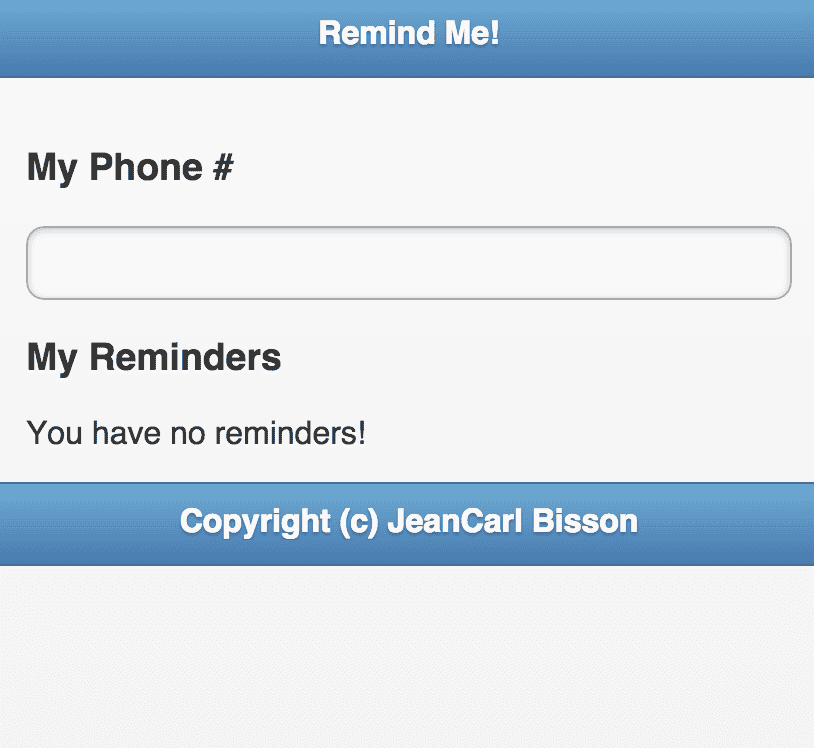
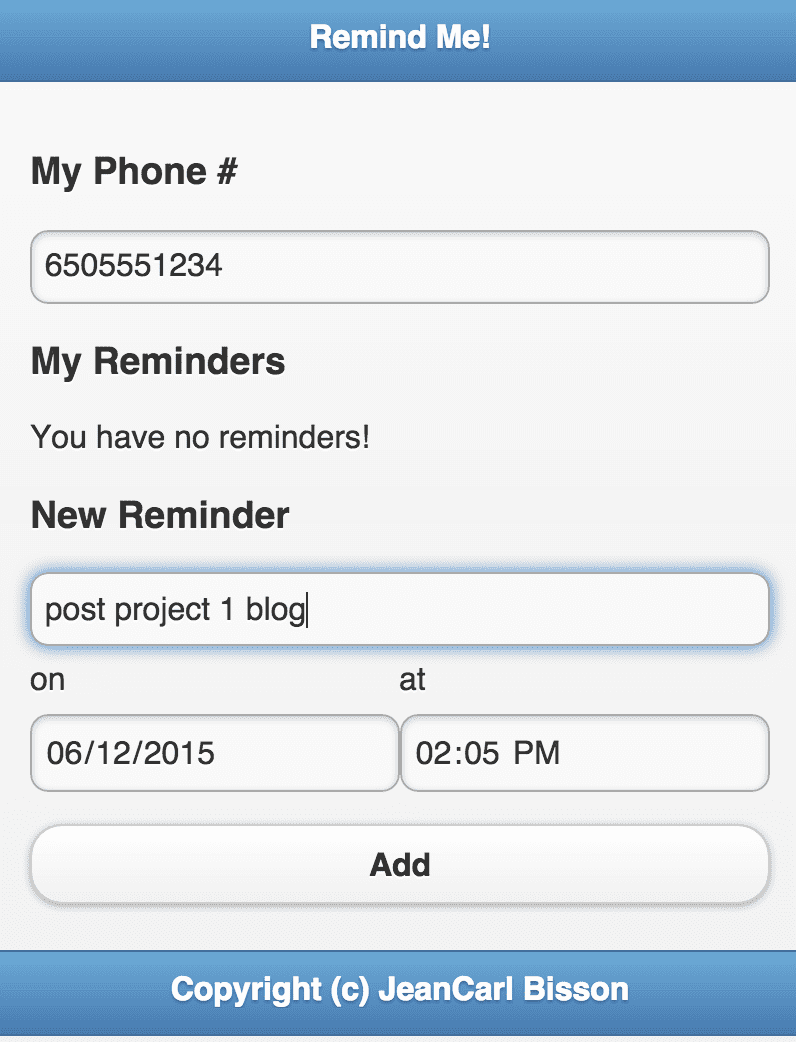
Open a browser and visit {{SERVERIP}}:8080, where {{SERVERIP}} is the IP address or domain name of the server. This should be displayed.

Photo

Let’s try it out. Enter a 10-digit phone number into the box.

Photo

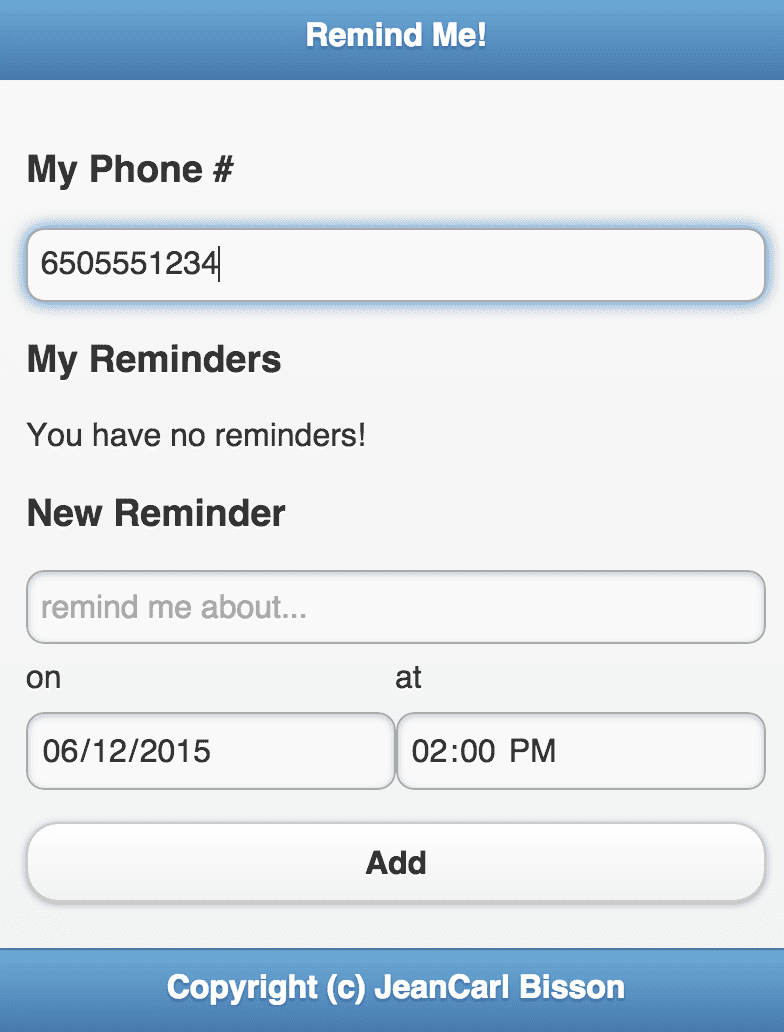
No reminders show up for this phone number. Let’s add a new reminder.

Photo

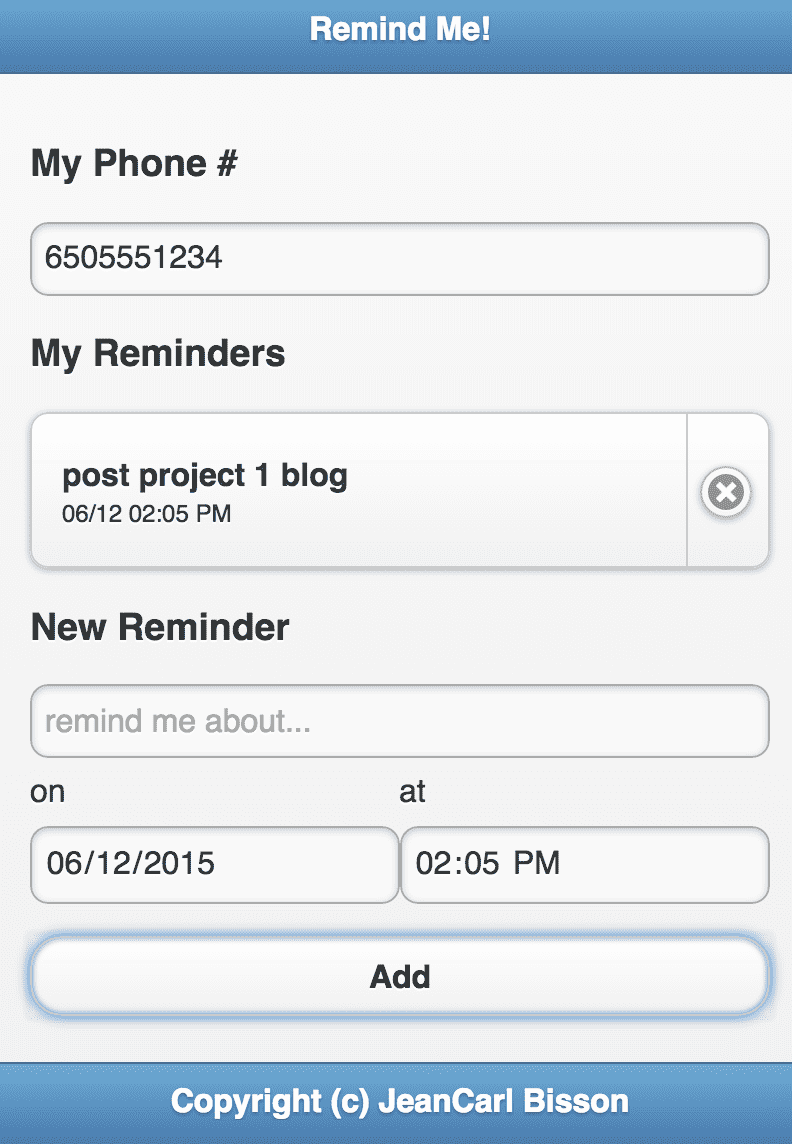
After clicking on Add, a request is made in the background to our Node.js app, which adds a new reminder object into our MongoDB, returns the object to our AngularJS app, which adds it to the reminders list, and updates the list.

Photo

Pretty exciting! We’ve used JQuery Mobile, AngularJS, Node.js, and MongoDB. But what happened to Twilio?

If you open up another terminal window and run sendreminders.js, the magic will happen.

nodejs sendreminders.js

sendreminders.js checks the queue for messages that should be sent out at the current time. By default, it’s checking every 5000 milliseconds, or 5 seconds. If all goes right, after the specified interval has passed, you’ll see one of two things. If there’s a message set to be sent before “now”, you’ll see the state:

1434143473650
sending post project 1 blog to 6505551234
SM38XXXXXXXXXXXXXXXXXXXXXXXXXXXXXXXXXXXXXXXXXX3

Otherwise, it’s going to state a heartbeat and that no messages have been sent:

1434143473650
no messages to be sent

The number 1434143473650 is the time in milliseconds. When a message is sent, go back to the website, refresh the page, and you’ll see that it has been removed from the list.

That’s all there is for this project. There’s plenty more that can be done with this basic example.

  • Any phone number can be entered. Validate that the number is valid. Twilio has a service for this. Also validate that there is a message.
  • Add the option to text a Twilio number a message like "06/13/2015 14:02 remind me at 2:02pm on the 13th". It should send the message "remind me at 2:02pm on the 13th" at 06/13/2015 14:02.
  • Add the option "in one day, remind me at 2:02pm on the 13th"
  • Add multiple recipients to one reminder.
  • Add a snooze option. Maybe it isn't a good time to complete the task.
  • When a message is sent, remove it automatically from the list in index.html. Right now you have to refresh the page or click on and click out of the phone number field for the list to refresh.

Source Code

You can find the repo on GitHub.

Post mortem

I didn’t have enough time to really dive deep into how MongoDB or AngularJS work. This will likely take a couple more projects to get the hang of it. But MongoDB seems to be pretty neat in storing JSON. And AngularJS is pretty sweet with data binding and moving the data around the app.

I also need to figure out form validation to prevent invalid data from being used.

15 Projects in 30 Days Challenge

This blog post is part of my 15 projects in 30 days challenge. I’m hacking together 15 projects with different APIs, services, and technologies that I’ve had little to no exposure to. If my code isn’t completely efficient or accurate, please understand it isn’t meant to be complete and bulletproof. When something is left out, I try to mention it. Reach out to me and kindly teach me if I go towards the dark side. ;-)

This challenge serves a couple of purposes. First, I’ve always enjoyed hacking new things together and using APIs. And I haven’t had the chance (more like a reason) to dive in head first with things like AngularJS, NodeJS, and MongoDB. This project demonstrated AngularJS, Node.js, MongoDB, Twilio, and JQuery Mobile. That’s a handful in two days, plus a blog post.

Tata Communications Future of Collaboration

July 14, 2013 | Hackathons

This weekend I went to Tata Communications Future of Collaboration hackathon at nestGSV in Redwood City. With such a broad category of making collaboration easier, it was hard to narrow down what our team wanted to build in less than 18 hours.

While enjoying a delicious dinner from SF Whisk, our team started brainstorming.

Photo

What if you had access to a remote team of experts that you could ask questions or form longer term relationships for services like legal and regulatory tasks.

Sure, there are plenty of hire me sites like eLance and oDesk. But their bidding process and the time to get up and running (as in getting connected to the person) is sometimes longer than one is willing to be patient and wait.

What if you could connect to that A-team of experts and get an opinion on the best way to implement a feature in your product? That’s where One Dynamic comes in.

We came up with six categories for One Dynamic. FDA, Startups, Patents, Automotive, Finance, and Retail.

Photo

Of course there are many more categories than we added. And we could probably further divide these categories into subcategories. But for the demo, we wanted to keep things simple and quick. Remember the other hire me sites? They take time to get through. We want to save the user time.

When you select a category, you are shown a list of available teams with expertise in that category. You can choose a team that’s available to chat that is most appropriate for your situation. Looks like Team Awesome is a good fit for my question.

Photo

There’s a team profile with more details so you can confirm it is the team you want to chat with. You can either provide an email address or login to connect.

Photo

The members of the team get a text message via Twilio if they aren’t online. As everyone comes online, you see a video of each. The client can then ask their question and the experts give their opinion or answer. Each expert can immediately provide feedback on another expert’s solution.

In our example, Ash gave an answer that was good, but wasn’t the best. Matt suggested another solution and Ash immediately agreed the second option was better. If I had only talked with one expert, I would haven’t known about another option to solve my problem. Two heads really are better than one.

Because I like how this remote team handled my question, maybe they have provide another service that I could utilize. I can click on the Hire team link after the conversation and be able to secure a relationship for the long term.

Ash and JeanCarl presenting in front of the judges

Benefits

What are the benefits of One Dynamic? Quick answers, validated answers, and the ability to then form a long term relationship.

There was no cost to try One Dynamic. The team gave me a quick and free consultation. If the team ended up not knowing anything, which would be rare with a vetting process, I would have only wasted a minute or two of my time. The remote team of experts has provided a quick consultation and has the opportunity to make a long term relationship where they can charge for their services. They didn’t have to pay for marketing costs to get in front of the client.

I got a validated answer very quickly. Having multiple points of view quickly validated the answers I got. And if something wasn’t clear, I could have asked for a clarification or examples.

Lastly, because of the great experience of getting the answers in a timely fashion, I will be more likely to come back and pay for their time the next time I need something. First impressions are really important and this quick meeting can make or break a relationship.

Matt, JeanCarl, and Ash working through the final adjustments before the demo

Why is One Dynamic unique?

One Dynamic is all remote video conferencing. That means each person can be a different place, a different timezone, and work a different schedule. For example, the two experts could work together as a team, but are a far distance from each other. As a client, I can connect from anywhere. If I needed legal help without One Dynamic, I may have to wait for the whole team to get together and then talk with me. With today’s technology, that doesn’t have to happen.

One other idea we had was that you could create a team of experts that don’t know each other but have a common pool of talent. Just using their knowledge and expertise, they could collaborate on the client’s problem, making it a dynamic team. You could add and remove team members over time and maintain a team that can answer a variety of questions.

Here are some pictures I took during the hackathon.

Hacking outside in the quad near a DJ mixing it up

An assortment of breakfast items to get started hacking on day 2.

The 333 truck feeding lunch to hungry hackers

Burritos and tacos were among the options for lunch

This device allowed a remote operator located in New York to travel around the room and talk with hackers in real time.

Hackathons aren't just about coding. We met this friendly visitor from Lisbon who came to see what a hackathon was all about. She ended up helping in a demo.

AT&T Public Safety hackathon

May 20, 2013 | Hackathons

AT&T held another hackathon this weekend at the AT&T Foundry in Palo Alto. This one was focused on public safety and making dangerous situations safer using technology.

Alex Kreilein and Alex Donn kicking off the first public safety hackathon AT&T has held

On Friday night, a number of law enforcement professionals from across the country came to talk about what life is like being an officer and protecting our communities. It was a gold mine of ideas that should have motivated everyone to step it up to the next level.

As I blogged about on Friday afternoon, there are so many things that can go wrong when responding to an emergency. I didn’t even touch on what these guys said. By the end of the evening I can honestly say I felt defeated. With all my skills and motivation, public safety is a really hard problem to solve. Anything I could create in 24 hours would barely touch what we as a country and the world need to solve. It’s a never-ending battle. With this hackathon, though, we can start small and make a difference.

Some things that really got to me was the example where the officer making a traffic stop has to keep a visual on the suspect. One second looking down at a computer screen is enough time for a suspect to fire a bullet at the officer. Wow, when you put it that way, we have to change the way an officer gets information. A heads-up display can be used to provide the officer valuable information. Is that why officers and dispatchers still communicate license numbers over the air?

Another example was license plate recognition software. If a vehicle is fleeing the scene of a crime, the plate can be put into a system that connects to other cities automaticall. Other patrol cars are automatically scanning every license number it can see as it drives down the street. It just so happens a patrol car in another city captures the license plate that matches the fleeing vehicle. The officer is alerted that this vehicle is connected to a crime and can proceed to do a traffic stop. You have taken a moving needle in a ever changing haystack and making it super simple and automatic to locate the needle. That was impressive.

With many ideas and so few hours to code, it was time to get down to business.

Bean bag. Check! Pandora. Check! Public safety idea. Check!

Mountain View iReport

I have always had a problem when I have something to report that my police department should know about. Do I use social media? Do I call 911? Do I call the non-emergency number? What is that number again? I had a small card on my fridge that I got from the PD outreach at one of the festivals downtown. But my magnets took over that real estate. I also changed cellphones and never put the number on the new phone. I’ll get to it after I finish this movie. Honest! It’s been at least six months. Seriously, I’ll stop this procrastination. Eventually. Probably after I can’t make the phone call and realize the fatal cost of my stupid procrastination.

I’m not alone. At the beginning of my presentation, I asked a simple question. Do you know the non-emergency phone number? No one raised their hands. I asked about the emergency number, and most raised their hands. That wasn’t surprising, but it was disappointing.

Even if I had the phone numbers, I, a normal citizen have to determine whether the situation I’m reporting is an emergency, something timely, something that can’t be acted upon, or just another datapoint. I think of myself as someone who can analyze these situations better than the average citizen. I’ve been there, done that numerous times. So if a percentage of our population has no clue how to report an incident, or doesn’t take the time to actually report the situation, how can we help them to do so.

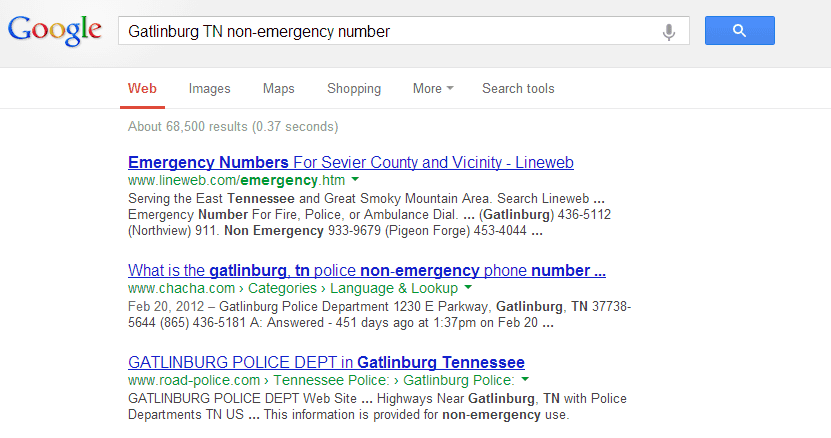
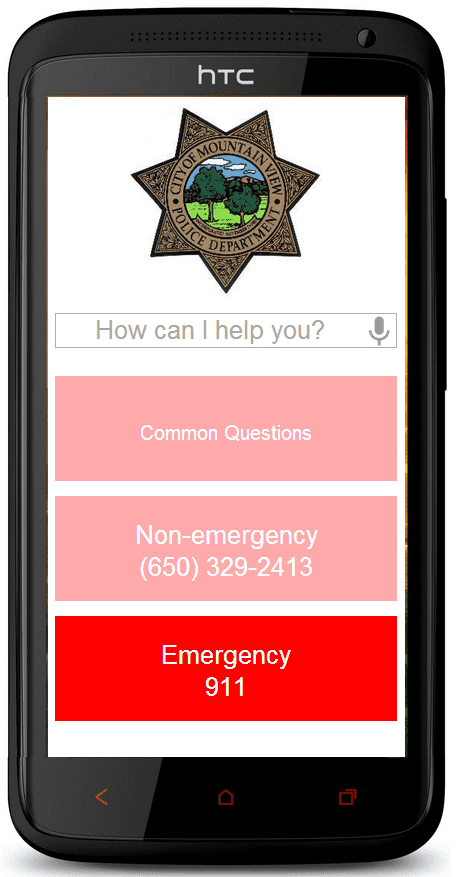
I created a simple mobile app screen. There are two critical buttons. The emergency and non-emergency phone numbers that you should call that are customized to your current location. If I’m in Palo Alto, a Mountain View non-emergency number won’t help me. I travel occasionally and sometimes I have no idea what city or state I am in. Wait a minute while I pull out Google Maps and get my current location. Oh Gatlinburg, Tennessee. Wait a moment while I Google Gatlingberg TN non-emergency number.

How long does it take you to find the non-emergency phone number?

That first result has a couple of numbers, I’m feeling overwhelmed. Let’s try the second result, ChaCha. Where’s my pen so I can write the number down. With my shaky hands, I try to dial the number and misdial. If I’m lucky, I’ll get this right before I give in. This is why we default to calling 911. At this point I don’t care if it’s not an emergency. I am panicking because I can’t get the right number to call. It is now an emergency in my mind.

Prominent buttons with emergency and non-emergency phone numbers are available with no searching required.


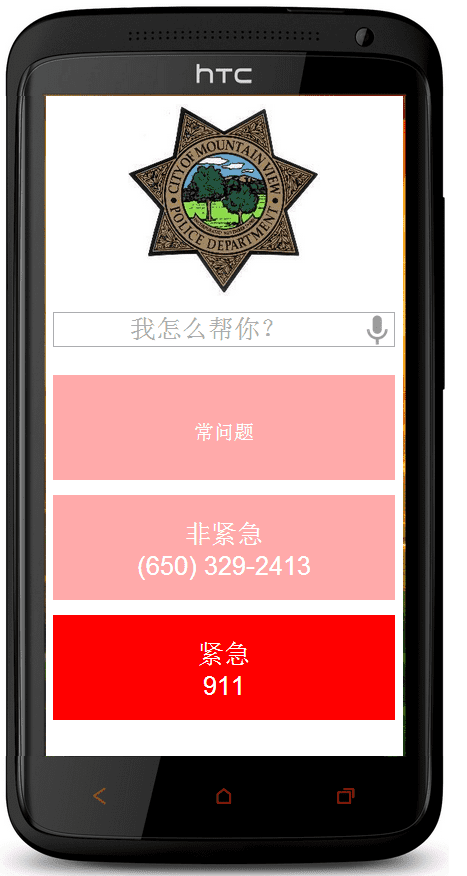
Buttons are also translated into different languages, this one Chinese. An option to change the phone numbers depending on language is also customizable.

I know this happens everyday, all across the country. And those dispatchers take the call like it’s the first one they have received today. They process it, never dismissing my concerns. And then they answer the next call, which might be the life-threatening call of someone in cardiac arrest. That’s a true emergency.

Is the female screaming and the car spinning it’s tires at 1:20 in the morning an emergency? What about the car driving 25 mph in a 45 mph? Or the car with their headlights out? Damn it, what am I supposed to do? Sometimes I choose not to be a good citizen and just hope for the best. It’s too much trouble and I don’t want to bother the dispatcher with my report. I shouldn’t feel that way but I do because the system is broken.

I also added a way to ask a question using voice input. You could say I heard a gunshot, or saw a broken window, or my neighbor is playing loud music. Depending on the severity, you may get a FAQ telling you how to handle loud music. Talk with your neighbors, a page on the Mountain View website says. I shouldn’t have to Google for the answer. Good to know the non-emergency number should be second after my neighbor refuses to answer the door.

For non-emergency cases like a neighbor playing loud music, the app will provide answers to questions with an option to escalate the situation.

The problem I had was that my first example was a scenario where I heard a gunshot. The app originally took a report and sent it to the dispatcher. But after reviewing it with two advisers who were on hand to answer any questions we had, it really became a situation when I should call 911. But that became very ambiguous. In the middle of Texas, gunshots are common. Those are hunters. Nothing to be worried about. In the middle of Palo Alto. Well, that could be serious. So maybe the app could differentiate the situation based on location?

Since we're in Palo Alto, hearing a gunshot should be escalated to a 911 call. Tap to make the call.

I am still conflicted in how emergencies are classified. So is the gunshot example classified differently based on location? Could the app differentiate that? As I quickly found out, artificial intelligence won’t be able to handle what a human dispatcher can think through and solve immediately. So we’re back to calling 911 because that’s the default way to handle these reports.

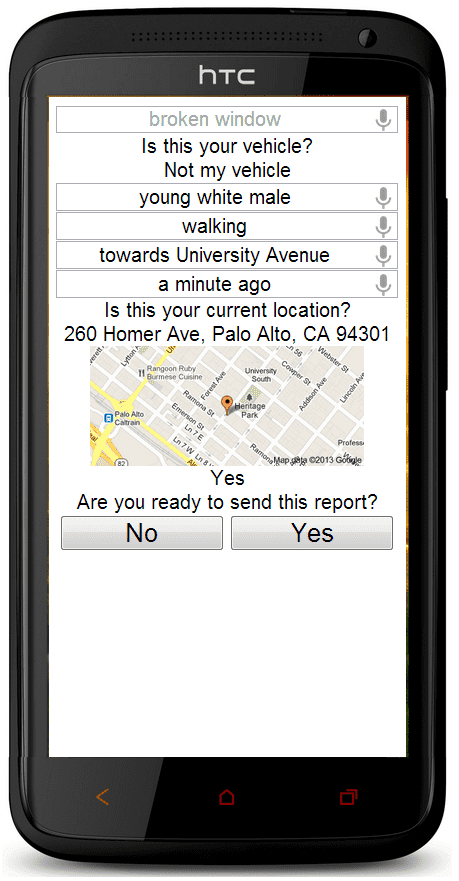
Let’s say I spot a broken window, or my bike was stolen. Actually, my bike was stolen. 311 now handles those reports for San Francisco. I called in, gave them details and got a case number. They don’t send an officer out. I don’t send pictures of where I locked up my bike and the exact location isn’t communicated because it is in the middle of a very long block and the building I’m in front of doesn’t have a street number because it’s a massive building. I’m on the phone so I can’t use Google Maps to get a more approximate location. I’m irritated and I don’t properly report the property theft. And I don’t have a bike so I have to walk to the train station in the rain.

So this situation should (depending on your criteria, which feels like it was constantly changing) be a good example where I submit a report. It isn’t glamorous and doesn’t solve crime immediately. But it does take the load off of 911 (or 311, or maybe it’s another number, give me a second!). The ten minutes I spent on the phone with 311 meant two or three calls (that’s my guess) got answered by 911 and may have saved lives. And attaching pictures and video is easy.

The app will walk you through reporting the broken car window. It will tailor the experience based on your location and the answers you provide. The next version will be completely voice controlled, with both sides speaking so the reporting party won't have to read anything. It will also allow pictures and videos to be submitted.

If you’re still with me, I apologize for this being all over the place. It is a very complex problem that still hasn’t been solved. And I still don’t understand it myself, even with experience reporting various incidents I have deemed to be important to report. So without a detailed knowledge of how the police department operates, this next part could be completely wrong. But as an engineer and geek, I like to dream up innovative ideas that may never see the light of day. But without the seed, the plant will never grow.

What happens when there are multiple reports of a loud noise (was that a gunshot or a firework)? Occasionally, Mountain View residents hear aerial fireworks. Some citizens call in and report their location. It should be relatively easy to create a perimeter as more locations are added. Why make the dispatcher dedicate their time to a trivial problem. Can’t technology be used to triangulate reports and use past incident reports to predict possible outcomes? Yes there is ShotSpotter, and that’s a good, but it is an expensive start.

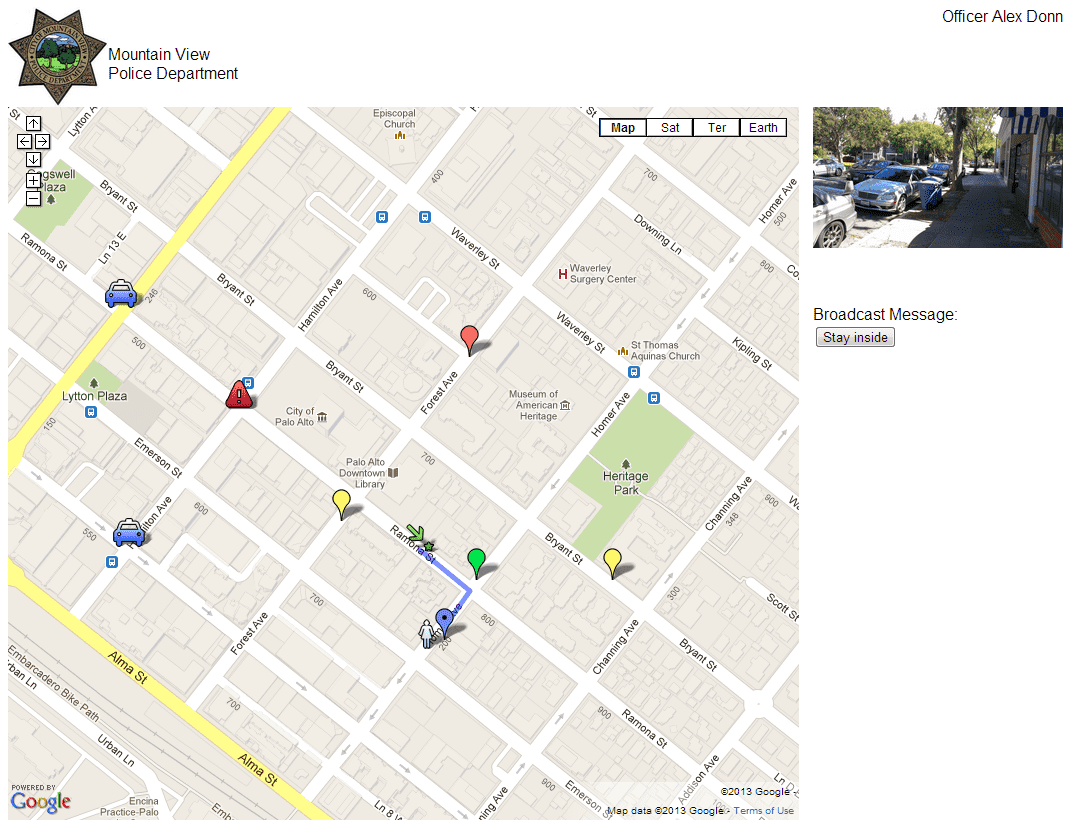
Keeping with my original gunshot example, I wanted to take incoming reports and start mapping them. Analyzing all the data, my dream solution was to be able to accurately inform officers of traffic obstructions and the predicted path the suspect was fleeing. A big flaw in this is that it wouldn’t be 100% accurate. And that brings up liability. The police department is accountable for everything it does. Everything has to be documented. Everything has to be coordinated. Everything has to work together. That’s why dispatchers are critical in the successful operation. So sending officers on a wild goose chase isn’t good (or efficient).

Seeing this data visually can help aid in the process of tracking down where the crime is happening. Like the Boston marathon bombings, the more pictures and video they had, the easier it was to locate the suspects.

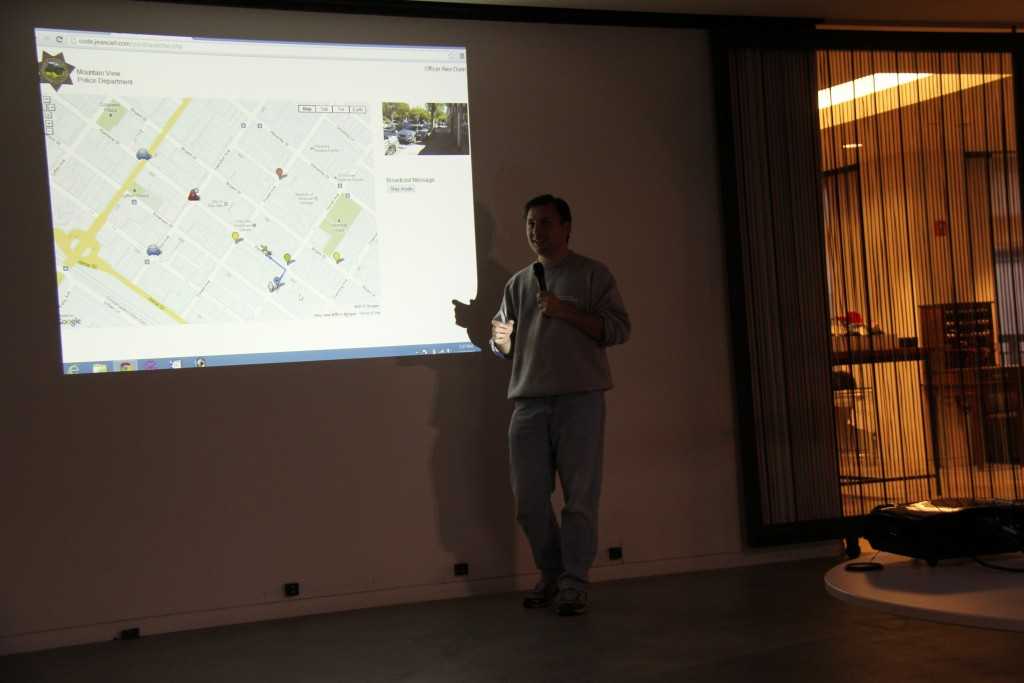
Blue cars are dispatched to the reports. Red pins are outlying reports, yellow are considered credible reports, and green are visual reports of suspects. Using these data points and past crime patterns, the system will predict the suspect's probable next move so the dispatcher can allocate resources efficiently.

Where do we go from here?

In trying to solve a one problem, it seemed like there were even more problems created or exposed. So Mountain View iReport isn’t the end all, be all solution. The one concept I walked away with was a voice recognition solution where you don’t have to type in anything. My shaky fingers when I’m trying to find that phone number won’t be able to accurately type what I’m trying to report. My first method of communication is voice. Let me talk this through until you understand what I am saying and can act upon the situation I’m reporting.

As for determining what is and what isn’t an emergency and how to respond to each situation, that’s a hard one to solve. Maybe we have to rethink how to better handle an influx of calls when everyone notices something is wrong and calls in. To at least encourage people to start reporting what they see. Because if they don’t, no one else will, and there will be no data points to work with to solve the problem we all see and ignore because “the person standing next to me will report it” (sometimes an wrong assumption).

Congresswoman Anna Eshoo

I have been to lots of hackathons, big and small, but this one was different. On Saturday night, our very own Congresswoman Anna Eshoo came to talk to us about the importance of the innovations we were making for public safety. I applaud her for coming on a Saturday night, thanking us for our time and acknowledging the efforts we all can make to make our community safer. Keep us the great work!

Congresswoman Anna Eshoo encouraged hackers to keep innovating

Photo

Photo

 Pictures

This was AT&T’s first public safety hackathon. I really, really hope to see more of these hackathons. And it doesn’t have to be a tech company hosting. Why can’t my police department host one and have an open dialogue with the community? Here are some other photos I took throughout the weekend.

Sausage and bacon breakfast sandwiches started the day off!

Assortment of sandwiches were delicious.

Four legged undercover hacker looking for anything in particular? Uh oh!

Showing off an ambitious map, powered by artificial intelligence, to better dispatch resources.

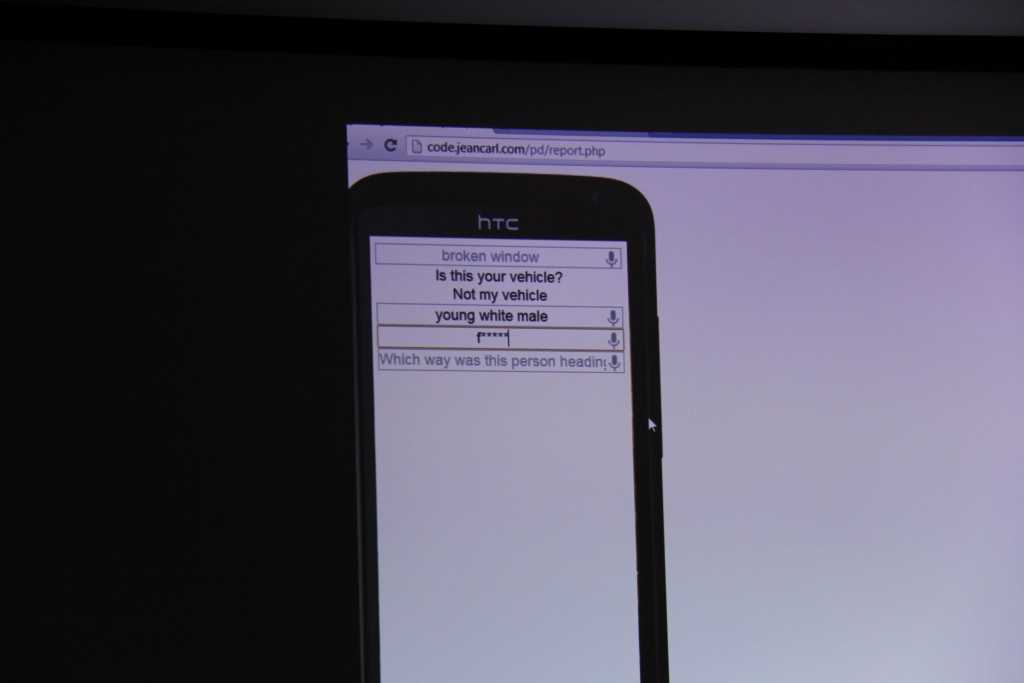
When voice recognition isn't accurate...

More sugar should keep us alert for the demos!